Showing posts with label network. Show all posts

07 February 2022

Linux Network namespace

Do your own virtual network container

*marvelous


https://iximiuz.com/en/posts/container-networking-is-simple/

17 December 2021

09 November 2021

SFP

SFP Port vs SFP Module 

SFP Port: slot on network device 
SFP Module: (or transceivers) to be insert in SFP Port 

SFP+  suport 10Gbps and 
QSFP+ 40Gbps 


 ref: https://www.trentonsystems.com/blog/what-is-an-sfp-port

01 December 2020

Pcap Header

Format pcap file 


Dalam Global Header, ada timzone info.

Dalam Packet Header ada timestamp.

Dalam Packet Data ada network traffic yg lalu (dihantar/diterima) NIC tersebut.


Packet vs Frame

Frame is refer to data link layer
Packet refer to network layer


Ref:

- https://www.elvidence.com.au/understanding-time-stamps-in-packet-capture-data-pcap-files/


30 November 2020

Edit Pcap guna Scapy

 Scapy adalah library python yang boleh digunakan untuk edit packet dalam dalam fail pcap.


Cara nak tukar timestamp pada setiap packet


from scapy.all import *

pkts = rdpcap(infile)
for p in pkts:
    p.time = p.time + tukar
    pmod=p
    cooked.append(pmod)

wrpcap("out.pcap", cooked) 


Cara nak tukar mac address

mac_asal = a
mac_baru = b

if ARP in p:
    if p[ARP].hwsrc == mac_asal
           p[ARP].hwsrc = mac_baru


19 July 2020

force client close connection tcp reset

I have ssh client connect to my server for reverse tunnel.

But sometime the connection idle(I cant ssh to the tunnel(no respond)).
So need to find a way to force client close the connection. (my script on the client will reconnect everytime connection closed)


If I just kill the process on the server, by looking the process id via 'netstat -punat', the process will terminated. But the client does not re-initiate the connection. I believe, on the client side, the process still somehow believe the connection is still on going.
Thus, this not is my attempt to find a solution how to safely force the client to close the connection, so that my script will re-connect back to the server.


First suggestion:
On linux kernel >= 4.9 you can use the ss command from iproute2 with key -K
ss -K dst 192.168.1.214 dport = 49029

  the kernel have to be compiled with CONFIG_INET_DIAG_DESTROY option enabled.
Unfortunately this method is not workable on my server, maybe the kernel no compiled with those features


2nd approach:
Using killcx
On centos:
yum --enablerepo=extras install epel-release
yum install perl-Net-IP

yum install cpanspec


ref: https://unix.stackexchange.com/questions/71940/killing-tcp-connection-in-linux

ref 2: https://superuser.com/questions/127863/manually-closing-a-port-from-commandline/668155#668155

ref3: https://www.tecmint.com/install-perl-modules-using-cpan-on-centos/

26 September 2019

DNS ubuntu18 'resolv.conf vs systemd-resolve --status'

Dah set di netplan utk guna more than  1 DNS, (boleh verify guna systemd-resolve --status)
Tapi di /etc/resolv.conf masih guna 127.0.0.53

Penyelesaian:

cd /etc
sudo ln -sf ../run/systemd/resolve/resolv.conf /etc/resolv.conf


ref: https://www.linode.com/community/questions/17081/dns-stops-resolving-on-ubuntu-1804

04 September 2019

Masalah mount windows share folder

semak senarai share folder windows dari linux

smbclient -L  -U  -d 256


ubuntu 16 default guna protokol smb 1

Manakala window tak support smb1, sebaliknya smb2.1 dan 3.

Maka tambah -m utk specify protokol

smbclient -L  -U  -d 256 -m smb2

Utk mount tambah vers=3 pada parameter -o

sudo mount -o vers=3.0,username=,uid=,gid=,forceuid,forcegid, //IP_Address/share_name /mnt/path/


Domain(Active Directory) user:
smbclient -L  -U _user_  -W _domain_name_ -d 256 -m smb2
sudo mount -o vers=3.0,username=_user_,domain=_domain_ //IP_Address/share_name /mnt/path/

Interactively:
smbclient //10.108.242.242/FSC -U _user_ -W _domain_


02 October 2017

26 September 2017

13 September 2017

vpn vs mtu

Kadang-kadang akan ada masalah dengan vpn. Contoh website boleh dibuka dari host Windows, tapi tak boleh dari ubuntu.

Salah satu penyebab adalah size MTU(Max Transfer Unit)

Secara asal, MTU utk host Windows adalah 1300, manakala ubuntu 17 pula adalah 1500.

Cara nak kecilkan saiz mtu dalam linux

# ifconfig mtu 1300


Simtom kes di atas, bila TLS Handshake  tersangkut masa Server Hello(no 'Server Finish')

06 September 2017

Current DNS setting

Utk mengetahui komputer guna DNS server yg mana:

# nmcli device show

or

$ systemd-resolve --status

11 April 2017

tor hidden server/ dark web

bacaan yg bagus
http://blog.0x3a.com/post/153468210759/monitoring-dns-inside-the-tor-network

10 March 2017

Single vs Multi (fibre cable mode)


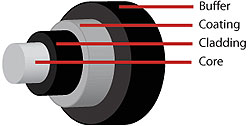
Kable Fibre Optik
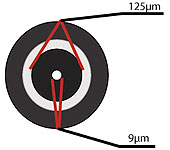
- Cahaya lalu pada core.
- Clading akan kepung dan pastikan cahaya sampai ke hujungnya


Single Mode
- Jarak lebih jauh
- Laluan kecil, perlu sumber cahaya yg kuat, device transmisi agak mahal


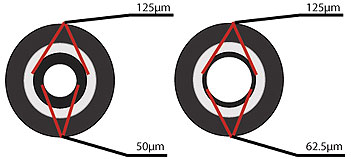
Multi Mode
- jarak bawah 10 batu
- speed kurang sikit(aku pun confuse)
- harga device transmisi  kurang

18 October 2016

connect to wifi wpa2

This doc show how to connect to wpa2 essid using command line

DISABLE NETWORK_MANAGER dulu


 wpa_passphrase SSID PASSWORD > CONFIG_FILE
eg:
# wpa_passphrase myWifi mypassword > wpa.conf


 to list available driver
#      wpa_supplicant


# sudo wpa_supplicant -iwlan0 -c wpa.conf -Dwext
// -i  wireless card
// -c  config file
// -D  driver


ref: http://askubuntu.com/questions/16584/how-to-connect-and-disconnect-to-a-network-manually-in-terminal

15 October 2016

vlan Membership Flag

Here are the definitions that I pulled from page 126 of the User Guide:

T          --  The interface is a member of a VLAN. All packets forwarded by the interface are tagged. The packets contain VLAN information.
U          --  The interface is a VLAN member. Packets forwarded by the interface are untagged.
F          --  The interface is denied membership to a VLAN.
Blank    --  The interface is not a VLAN member. Packets associated with the interface are not forwarded.


ref:
http://en.community.dell.com/support-forums/network-switches/f/866/t/19495197

08 September 2016

Android DNS


Display dns use by android:
-getprop net.dns1
-getprop net.dns2


Set dns to use by android
-setprop net.dns1 113.113.113.113

05 July 2016

setup permulaan router Cisco IOS


List nic
  • show interfaces description
Gi0/0                          up             up
Gi0/1                          admin down     down
Gi0/2                          admin down     down
Lo0                            up             up


Configure vIOS routers as following.
Router>en
Router#conf t
Router(config)#hostname vOS-I
vIOS-I(config)#interface GigabitEthernet 0/0
vIOS-I(config-if)#ip address 172.16.1.1 255.255.255.0
vIOS-I(config-if)#no shutdown
vIOS-I(config-if)#do wr


List Routing Table
Router2#show ip route

Default GW
Router(config)#ip route 0.0.0.0 0.0.0.0 192.168.1.6


Enable SSh @ router
http://www.firewall.cx/cisco-technical-knowledgebase/cisco-routers/1100-cisco-routers-ssh-support-configuration-rsa-key-generation.html

Router (config)# username admin privilege 15 secret Firewall.cx      (Firewall.cx <- nbsp="" password="" ssh="" strong="" to="">
Router (config)# aaa new-model
Router (config)# aaa authentication login default local
Router (config)# enable secret $FirewAll.cx!           <- en="" mode="" nbsp="" password="" strong="" to="">
Router (config)# service password-encryption


R1(config)# line vty 0 4
R1(config-line)# transport input ssh
R1(config-line)# login authentication default
R1(config-line)# password $Cisco!    <- aaa="" authentication="" cisco="" guna="" nbsp="" ni="" pakai="" password="" sebab="" strong="" tak="">


Generating RSA key  (selagi takde key, ssh port tak enable)
R1 (config)#  ip domain-name firewall.cx
R1(config)# crypto key generate rsa 
The name for the keys will be: R1.firewall.cx
Choose the size of the key modulus in the range of 360 to 4096 for your General Purpose Keys. Choosing a key modulus greater than 512 may take a few minutes.                                                                                                                                                                                                     How many bits in the modulus [512]: 4096
% Generating 4096 bit RSA keys, keys will be non-exportable...
[OK] (elapsed time was 183 seconds)


OSPF:

Remove ospf process:
R1(conf)#  no router ospf 1

19 February 2016

LAG on PowerConnect

Notes:

LAG(Ling Agregation Group) adalah features utk kombine 2 atau lebih kabel/port utk bekerja sebagai satu group. Boleh pilih mode:
  1) failover(master mati, secondary ambil alih),
  2) LACP(Link Agregation Control Protocol)

Kalau nak guna LACP, both end kena suport dan enable dulu.

Untuk PowerConnect, boleh pilih utk enable atau tak pada menu:
   Switching --> Link Agregation -->  LAG Membership
Enable LACP on channel 1 and 2


Tapi ada kemungkinan pada remote port tak support LACP, maka setiap kali enable LACP, kena semak status LAG samaada up atau down di:
   Switching --> Porst --> LAG Configuration (ShowAll)
LAG Status pada Channel 2 Down


ref:
http://www.juniper.net/documentation/en_US/junos15.1/topics/concept/interfaces-lag-overview.html