ori: https://www.cyberbit.com/anti-vm-and-anti-sandbox-explained/
1. Checking CPU Instructions:
The result of the following instructions with specific input can help malware identify virtual environments:
2. Checking for Known Mac Addresses:
Prefixes of MAC addresses indicate the network adapter’s vendor. The MAC address can be retrieved in multiple ways, including the using of WMIC (wmic -> nic list)
The existence of the following registry entries indicates the existence of virtualization software:
Any of the following processes may indicate a virtual environment. Malware can retrieve this info in multiple ways like: WMIC, Win API and CMD. WMIC (wmic -> process list), Win API (Process32First, Process32Next), and Tasklist.exe.
When these files are found to exist in the file system, this may indicate the existence of virtualization software. These can also be retrieved in multiple ways like: WMIC, Win API and CMD.
C:\windows\System32\Drivers\vm3dgl.dll
C:\windows\System32\Drivers\vmdum.dll
C:\windows\System32\Drivers\vm3dver.dll
C:\windows\System32\Drivers\vmtray.dll
C:\windows\System32\Drivers\VMToolsHook.dll
C:\windows\System32\Drivers\vmmousever.dll
C:\windows\System32\Drivers\vmhgfs.dll
C:\windows\System32\Drivers\vmGuestLib.dll
C:\windows\System32\Drivers\VmGuestLibJava.dll
C:\windows\System32\Driversvmhgfs.dll
C:\windows\System32\Drivers\VBoxGuest.sys
C:\windows\System32\Drivers\VBoxSF.sys
C:\windows\System32\Drivers\VBoxVideo.sys
C:\windows\System32\vboxdisp.dll
C:\windows\System32\vboxhook.dll
C:\windows\System32\vboxmrxnp.dll
C:\windows\System32\vboxogl.dll
C:\windows\System32\vboxoglarrayspu.dll
C:\windows\System32\vboxoglcrutil.dll
C:\windows\System32\vboxoglerrorspu.dll
C:\windows\System32\vboxoglfeedbackspu.dll
C:\windows\System32\vboxoglpackspu.dll
C:\windows\System32\vboxoglpassthroughspu.dll
C:\windows\System32\vboxservice.exe
C:\windows\System32\vboxtray.exe
C:\windows\System32\VBoxControl.exe
6. Checking for Running Services
Identifying whether one the following processes is running indicates a virtual environment.
These can also be retrieved in multiple ways WMIC, Win API and CMD
(wmic -> Service list, sc.exe /query)
1. Checking CPU Instructions:
The result of the following instructions with specific input can help malware identify virtual environments:
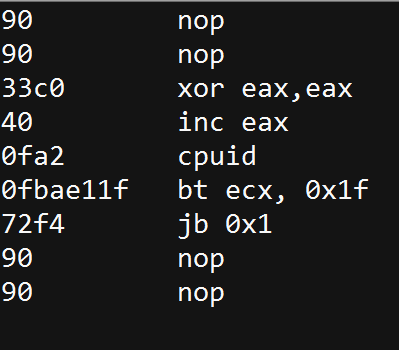
- CPUID: This instruction is executed with EAX=1 as input, the return value describes the processors features. The 31st bit of ECX on a physical machine will be equal to 0. On a guest VM it will equal to 1.
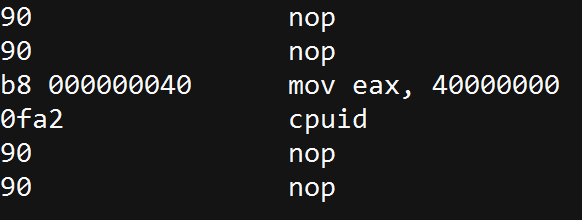
- “Hypervisor brand”: by
calling CPUID with EAX=40000000 as input,1 the malware will get, as the
return value, the virtualization vendor string in EAX, ECX, EDX.
For example:
- Microsoft: “Microsoft HV”
- VMware : “VMwareVMware”
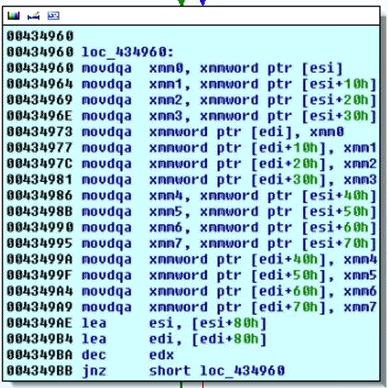
- MMX:
an Intel instruction set, designed for faster processing of graphical
applications. These are usually not supported in Virtual Machines so
their absence may indicate that the malware is running in a VM.
For example:
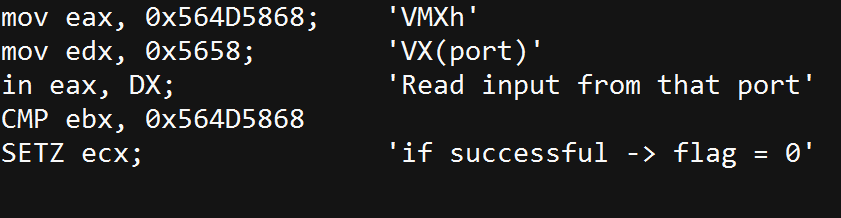
- IN – “VMWare Magic Number”: this technique is useful for detecting a VMware environment. In VMWare, communication with the host is done through a specific I/O port. The code below will execute successfully if running inside a VM. Otherwise it will fail.
2. Checking for Known Mac Addresses:
Prefixes of MAC addresses indicate the network adapter’s vendor. The MAC address can be retrieved in multiple ways, including the using of WMIC (wmic -> nic list)
- 00:05:69 (Vmware)
- 00:0C:29 (Vmware)
- 00:1C:14 (Vmware)
- 00:50:56 (Vmware)
- 08:00:27 (VirtualBox)
The existence of the following registry entries indicates the existence of virtualization software:
- HKLM\SOFTWARE\Vmware Inc.\\\Vmware Tools
- HKEY_LOCAL_MACHINE\HARDWARE\DEVICEMAP\Scsi\Scsi Port 2\Scsi Bus 0\Target Id 0\Logical Unit Id 0\Identifier
- SYSTEM\CurrentControlSet\Enum\SCSI\Disk&Ven_VMware_&Prod_VMware_Virtual_S
- SYSTEM\CurrentControlSet\Control\CriticalDeviceDatabase\root#vmwvmcihostdev
- SYSTEM\CurrentControlSet\Control\VirtualDeviceDrivers
Any of the following processes may indicate a virtual environment. Malware can retrieve this info in multiple ways like: WMIC, Win API and CMD. WMIC (wmic -> process list), Win API (Process32First, Process32Next), and Tasklist.exe.
- Vmware
- Vmtoolsd.exe
- Vmwaretrat.exe
- Vmwareuser.exe
- Vmacthlp.exe
- VirtualBox
- vboxservice.exe
- vboxtray.exe
When these files are found to exist in the file system, this may indicate the existence of virtualization software. These can also be retrieved in multiple ways like: WMIC, Win API and CMD.
- VMware
C:\windows\System32\Drivers\vm3dgl.dll
C:\windows\System32\Drivers\vmdum.dll
C:\windows\System32\Drivers\vm3dver.dll
C:\windows\System32\Drivers\vmtray.dll
C:\windows\System32\Drivers\VMToolsHook.dll
C:\windows\System32\Drivers\vmmousever.dll
C:\windows\System32\Drivers\vmhgfs.dll
C:\windows\System32\Drivers\vmGuestLib.dll
C:\windows\System32\Drivers\VmGuestLibJava.dll
C:\windows\System32\Driversvmhgfs.dll
- VirtualBox
C:\windows\System32\Drivers\VBoxGuest.sys
C:\windows\System32\Drivers\VBoxSF.sys
C:\windows\System32\Drivers\VBoxVideo.sys
C:\windows\System32\vboxdisp.dll
C:\windows\System32\vboxhook.dll
C:\windows\System32\vboxmrxnp.dll
C:\windows\System32\vboxogl.dll
C:\windows\System32\vboxoglarrayspu.dll
C:\windows\System32\vboxoglcrutil.dll
C:\windows\System32\vboxoglerrorspu.dll
C:\windows\System32\vboxoglfeedbackspu.dll
C:\windows\System32\vboxoglpackspu.dll
C:\windows\System32\vboxoglpassthroughspu.dll
C:\windows\System32\vboxservice.exe
C:\windows\System32\vboxtray.exe
C:\windows\System32\VBoxControl.exe
6. Checking for Running Services
Identifying whether one the following processes is running indicates a virtual environment.
These can also be retrieved in multiple ways WMIC, Win API and CMD
(wmic -> Service list, sc.exe /query)
- VMTools
- Vmhgfs
- VMMEMCTL
- Vmmouse
- Vmrawdsk
- Vmusbmouse
- Vmvss
- Vmscsi
- Vmxnet
- vmx_svga
- Vmware Tools
- Vmware Physical Disk Helper Service
